Stonehill
College
Mathematical Experiments in Computer Science
Professor Shai Simonson
Text Compression and Huffman Trees
Data compression is a technique which reduces
the size of a file or data collection without affecting the
information contained in the file.A
compressed file, obviously, requires less storage space.Moreover, electronic transfer of a
compressed file is faster than the transfer of an
uncompressed file and a smaller file is consequently less
susceptible to transmission errors.
Lossless compression means that we are storing all
the data; we are simply doing it with fewer bits. Sometimes when we compress audio or
video, we purposely store only part of the data;
that is called lossy compression. For example,
JPEG images are lossy while GIF images are lossless.
There are two major algorithms for lossless compression:
Huffman Encoding and Ziv-Lempel Compression.
This chapter http://web.mit.edu/6.02/www/f2011/handouts/3.pdfcompares the two. There are advantages and
disadvantages of each algorithm. In this LC, you work only
with Huffman. Indeed, you will mathematically prove that
Huffman encoding is, in "some sense", the best one can do.
Nonetheless, Ziv-Lempel is often the go-to choice nowadays for
reasons discussed in the chapter above. The rest of this
lab will concentrate on Huffman.
Huffman Compression
Consider
a simple “message” (or file) which is stored as a string of
characters using the ASCII code.Each
character in the message requires eight bits of storage.For example character“A,” (ASCII code 65)would
be stored as 010000001, character “B” (ASCII 66)would bet stored as 010000010 etc.In
fact, this very paragraphwould
require 3472 bits of storage (434 characters and eight bits for
each character).
One of the simplest but efficient methods of data compression was
introduced by David Huffman in his paper ``A method for the
construction of minimum redundancy codes.''Huffman’s
method is very intuitive.Unlike the
ASCII code which uses exactly eight bits to encode each
character, a Huffman code uses a variable number of bits
for each character. With Huffman’s scheme, a common character such
as “a” or “e” might be encoded withperhaps
just two bits and less frequently used characters like “q” or “#”
would be encoded with a longer bit string.Consequently,
the most frequently occurring characters are encoded with a
minimal number of bits.(Morse code
uses the same technique, “E” is encodes as a singledot, “T”just one dash,but “Q” is dash-dash-dot-dash). Because
ASCIIencodes every character with
eight bits we say that ASCII code is a fixed length code.Huffman’s code is a variable
length code.
We’ll begin with a trivial example.
Suppose we wish to encode the string “SHE-SELLS-SEA-SHELLS”
The ASCII code would require 160 bits (20 characters each
requiring 8 bits).
Notice, however, that thecharacters
which appear in the string have the following frequencies ( and
relative frequencies)
A1.05
H2.10
-3.15
E4.20
L4.20
S6.30
A possible variable length code which uses just 2 bits to encode
frequently used characters like “S” or “L “ might be:
CharacterCodewordFrequency of Character
A0000 1
H0001 2
-
001 3
E104
L11 4
S01 6
We will refer to this code as Code 1.We
will also use the term “codeword” to denote an individual
character code.Thus, 0000 and 001
are codewords.
Notice that “S” which occurs 6 times (or 30% of the time) is
encoded using just 2 bits and “A” which occurs only once is
encoded with 4 bits.
With this code, the string,“SHE-SELLS-SEA-SHELLS,”
can
be encoded with just 49 bits:
0100011000101101111010010110000000101000110111101
You may wonder why we didn’t use a “more efficient” code like:
S0
L1
E00
- 11
H01
A10
( Code 2)
Using Code 2 we can encode the string “SHE-SELLS-SEA-SHELLS” as
001001100011011000101101000110
which uses a mere 30 bits.Certainly,
compressing the string to 30 bits is more efficient than storing
it as 49 bits.So, why not use Code
2?It does the job with fewer bits.
To answer this question, consider just the simple substring,
“SHE.”Usingthe
ASCII coding scheme, “SHE” is encodedas
010100110100100001000101
Now, if we wish to decode (or translate this bit string back to
ordinary, readabletext), we simply
look at each successive group of exactly 8 bits:
01010011 -(83)– “S”
01001000 -(72)– “H”
01000101 -(69)– “E”
That’s all there is to it.
Now, let’s encode “SHE” using our “more efficient” Code 2:
00100.
Wow! Just 5 bits!
Now, given this five bit string, how do we decode it?Do we decode 00100 as“EAS”(0010 0)oras “ SSLE”( 0 01 00 ) or perhaps as
“SSLSS”(0 01
0 0) ?You really cannot tell
without putting some marker between the codewords for each letter.
On the other hand, using Code 1 we encode “SHE” as
01000110.
To decode this bit string , simplyscan
the
string from left to rightuntil you
find a complete codeword.You have
just decoded the first character.Continue
the
process until you have scanned the entire bit string.You will see there is no ambiguity.
01000110
SHE
Exercise 1.
a. Decode each of the following bit strings which are
encoded with Code 1:
01000011001011011110100110101101
00010000110010001000001001000110101101
b. Now,
using the following bit string, show that Code 2 is ambiguous.In other words, find two possible
translations of the following bit string:
01011100011011001000
c.
Explain why Code 1 is not ambiguous.What
property
does Code 1 have which ensures that each bit string has a unique
translation?
Prefix Codes
For arbitrary variable length codes, we may not be able
determine the end of one codeword .For
example, using Code 2, do we interpret the bit string 0101 as
0.10.1 (SAL) or 01.01 (HH)or0.1.0.1 (SLSL)?Is
the initial letter encoded as 0 (S)or
01 (H)? Without some kind of marker between codewords, it is
impossible to determine where each codeword ends.Code 1 however, does not have this drawback.The bit string 00010000011 can have only one
interpretation:
0001.0000.001. Let’s look at this string.As we scan from left to right we see:
0 is not a valid code.Continue
scanning
00 is not a valid code. Continue
000 is not a valid code. Continue
0001 is the code for H. Done.
OK, we have unearthed an “H.” But how do we know that there is no
code that starts with 0001 ?How
do we know that 00011 is not the code for some other
letter?
If you look closely at the codewords of Code 1, you will notice
that no codeword is a prefix of another codeword.The codeword for “H” is 0001.No
other codeword starts with 0001.The
codeword for “S” is 01.Nothing else
begins with 01.Thus, using a
left-right scan, once we read 0001 we recognize the codeword for
“H.”Further, we know that 0001 is
not the start of the codeword for some other character, since no
other character code begins with 0001.
Definition. A code is a prefix code (
or has the prefix property) if
no
codeword is the prefix of another codeword.
Again, Code 1 has the prefix property but Code 2 does not.The codes which we will develop
will have the prefix property.
A Huffman code turns out to be an “optimal” prefix code.We will be more precise about the
meaning of “optimal” a bit later.First,
let’s see how the Huffman code is constructed.
Once we look at the mechanics, we will take a closer look
underneath the hood.
Codes and Binary Trees:
Let’s look at Code 1 again: CharacterCodewordFrequency Relative Frequency
A00001.05
H00012.10
-
0013.15
E104.20
L114.20
S016.30
201.00
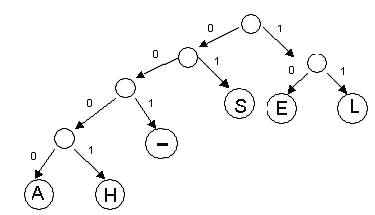
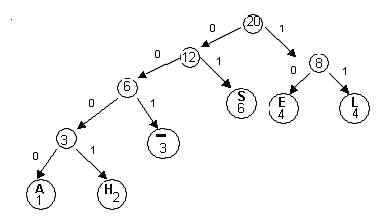
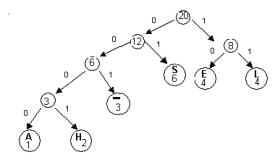
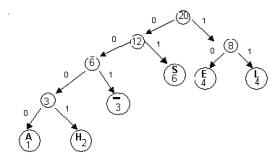
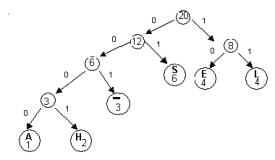
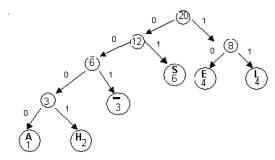
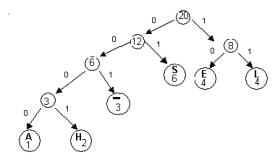
We can represent this code with a binary tree.On such a tree,
each left branch is labeled 0,
each right branch is labeled 1
the encoded characters are placed in the leaves
Notice that the concatenation of the branch labels on the path
from the root to any leaf gives the code word for the symbol
stored in the leaf.For example, the
path from the root to the leaf labeled “H’ is left-left-left-right
and the codeword for “H” is 0001.The
path to “L” is
right-right , so the codeword for “L” is 11.
Huffman’s Algorithm constructs such a binary tree in a bottom up
manner. The Huffman tree yields an optimal prefix codefor the symbols contained in the leaves.
Building the Huffman Tree.
First you build a frequency
array from the text.
Given the frequencies of each character in a file, the
Huffman tree can be constructed as follows:
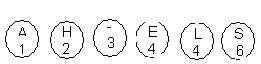
For each symbol to be encoded, make the binary tree consisting of
a single root.Each of theseroot nodes should holdthe frequency (or relative frequency)of one symbol. Ultimately, these nodes will be the leaves
ofour Huffman tree. This
can be implemented as a priority queue. The priorities are
the frequencies.
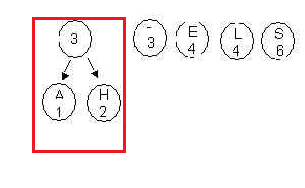
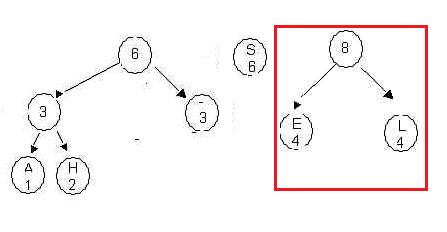
2. Choose the two trees with the smallest root values and merge
theseinto a new tree, as in the following
diagram. Here the trees labeled A and H are chosen. Priorities/frequencies
are 1 and 2. . The root of the new tree holds the
value 3 , obtained as the sum of the values 1 and 2. Place this in
the queue. Note if two trees
are the same weight, it makes no difference which comes first in
the priority queue. The order may make a different final
tree, but the overall cost will be
the same.
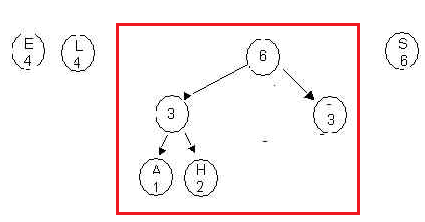
3.Continue the process, always
forming a new tree from the two trees with the lowest root values.
Here we merge the two trees each with 3 stored in the root into a
tree with root value 6. Place the new tree in the
queue. Four trees remain in the priority queue with
root values 4,4,6 and 6.
4.Continue this process..Remember always merge the two
subtrees which have the smallest root values. These are the
two trees with root values 4 and 4. Merge them into a single
tree with root 8 and place the new tree in the queue.
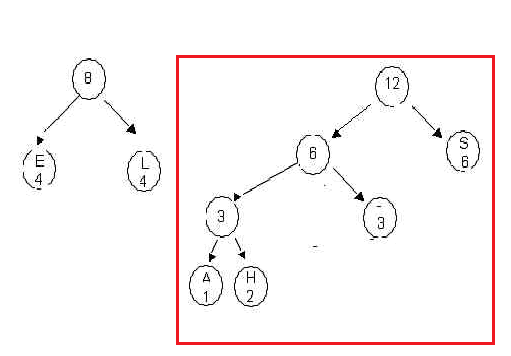
Now merge the two trees with root values 6 into a tree with root
12. Place the new tree in the queue so that two trees
remain:
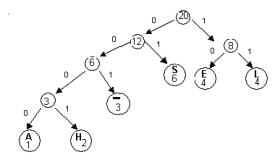
Merge the two trees into one final tree. Here is the final
tree, with each branch labeled either 0 or 1.
The following is a general algorithm: For each character c to be encoded
create a binary tree, consisting of a single root node r such thatcontent (r) =f(c),
the frequency of c Place each very simple tree into a priority queue S
where the priority is the frequency.
for i = 1 to n-1
{
From the priority queue ,S,remove the two trees, x and y, with
minimal values, f1 and f2 in the root
create a tree with root z
such that xis the left child of z y is the right child of z content(z) = f1+
f2 add
this new tree with root z to S.
}
Here is a full
example showing the tree being built from the
priority queue.
The priority queue is minimum queue stored as a sorted
linked list. Here is one
way to build the skeleton
of the BinaryTree class.
Notice how at each step
in the algorithm:
two trees are deleted from the queue,
a new tree is
built from them, and
that tree is
inserted back in to the
queue.
Using the Huffman tree to determine
the codewords. Once the Huffman tree is created, it is easy to determine
the codeword for each character.
Method 1: Bottom Up As we’ve seen, each leaf represents one character.If we begin at a leaf and proceed up
ttree to the root, we can “trace out”(in
reverse) the codeword for a given symbol:
For each leaf a
while a is not the root of
the tree if a is a left subtree
output
‘0’ else output ‘1’ a = parent(a)
Notice that the algorithm will output
codewords in reverse order.
Example: Let a be leaf “ -.”
a is a right subtree; output‘1’
a = parent(a)
a is a left subtree; output ‘0’
a = parent(a)
a is a left subtree; output ‘0’
a = parent(a)
a is the root; done
Output: 100; codewordfor “-“ is 001
Method 2 : Top Down -- this is easier
An ordinary, recursive tree traversal with an additional
parameter can also be used to determine the codewords: void traverse(string s, tree root)
Each time that the function is called recursively, pass it
strings concatenated with either
‘0’ or ‘1.’ When visiting a leaf, simply output strings –sis the codeword for character
associated with the leaf.
Encoding the file: Simply translate each character using a table of codewords:
Decoding a compressed file: When decoding a compressed file, you will once again use the
Huffman tree. Consequently, the frequency table must once again
be available.When the tree is
constructed, the text characters are stored in the leaves.Each codeword, determines a unique
path from the root of the tree to to the leaf holding the
translation of the code word.Once
we reach a leaf, we begin the decoding process again at the
root.
Example:Decode : 0100011.....
Begin atthe root:
0100011 –move left
0100011 – move
right A leaf—“S”(01 is the codeword
for S)
Go back to the root and continue the process.
0100011etc.
Exercise 2:
a. Construct a Huffman
tree for the alphabet A B C D E F where the relative frequencies
of each character are:
A.22 B.13 C.33 D.10 E.20 F.02
b. Use
the tree to determine the code word for each of the character of
this short alphabet
c.
Encode the string “AECBCAF”
Program 1.Encoding
a text file.
Write a program which will encode a text
file using the Huffman algorithm. The user interface should be very simple.Just provide the user with two prompts: Input file: Output file:
so that the user may supply the
name of the input (text) file as well as a name for the
compressed file.Your output should
actually be two files : the compressed file,and also a file with the frequency table .This second file should have the same
name as the compressed file and an extension of feq.For example if the compressed file is called
something.zip then the second file should be something.feq To encode text using a Huffman code you must
First
build a frequency chart for all characters in your text
Build a Huffman
tree
Make a list of
all codewords
Using the list of
codewords, encode your text.
Here are a few suggestions to help you with the implementation.
If you read the file a line at a time, you need to add \n into
the compressed file yourself after each line, because the read
method will not include the line feed.
Since ASCII values fall in the range0
...127, use a simple array (int freq[128]) to store frequencies.
For example,if 'A'
has frequency 13, then freq[65]will have
the value 13. Of course, not all ASCII characters will appear in
your text, so many entries in the frequency array will be 0.
When you build the Huffman tree, you must make a number of
design decisions.
As you know, the algorithm builds the tree incrementally.At each step, the sub-trees with
minimum roots must be chosen.The
simplest method for determining the these two minimum valued
trees would be to use apriority queue. Do not download Ralph's generic priority
queue. Instead, build your own priority queue of trees,
and create a class of trees made of Nodes each of which has
character, an integer, and two pointers to Nodes.
If you plan to build your table of
codewordsin a bottom up fashion, you
will need to maintain a table which holds the address of each
leaf on the tree.Also, each node
must contain the address of its parent. The top down
method is easier and is really just an inorder traversal which
keeps track of the codewords as you do the traversal.
Simply keep the codewords in an array indexed from 0 to 127 so
that you may access the a character’s codeword directly, i.e.,
without a search.Save your
frequency table to a file – simply list the 128 frequencies in
the array.
Program
2: Decoding a compressed file.
Write a program which will decode a
compressed file. Your program will need to use the tree and the
codewords that you built in Program 1, which had access to the
original uncompressed text. The easiest way is to read
through the bits of the compressed text one bit at a time and
simultaneously traverse the tree. With each movement on
the tree, check to see if you have reached a leaf, and if so,
add the character in that node to the decompressed text.
Your program should promptthe user for two file names: Compressedfile: Text file:
If the name of the compressed file is something.zip,
your program should use that file and also the file something.feq
as input.
For convenience,Program
1 encoded your text into characters (bytes), with each
byte equal to either ‘0’ or ‘1’. However,
storing each bit in its own byte will result in a file 8 times
larger than it needs to be. In order to realize the true
"real-life"compression, you must convert the bytes into
bits. To do this, every eight '0' or '1' characters
(bytes) is packed into a single byte. Pseudo-code to
accomplish this is given below:
While there are more 0/1 characters (bytes)
{
byte temp = 0;
for i = 1 to 8 //
This loop calculates the decimal value of 8 zeros and ones
and stores it in temp. If the number of bytes
in the file is not divisible by 8, just pad the file with a
few extra bytes.
{
b =
getnext_0_or_1_character(); // get the next bit (stored
in a byte)
temp = temp* 2 +
b;
// note that b
should be 0 or 1 (not the ascii value of b which would be 48
or 49)
// Note that to
do this correctly in Java, you will need to cast the
expressions to bytes, since Java automatically up-casts bytes
to int when doing arithmetic
}
// store temp in a byte array or just print
the byte to a file directly with PrintWriter
}
For example, given the bits 10010011,
the byte "temp" grows from 0 like this: 0, 1, 2, 4, 9, 18, 36,
73, 147.
These numbers represent the decimal value of the 8-bit
binary number 10010011 as it grows from left to right.
(Note that Java stores byte values as two's complement signed
numbers, so if you try to print out these bytes, it will display
negative numbers for any unsigned value greater than 127.
For example, 147 will display in Java as -109. This will not
affect your compression at all.)
Take the output of Program 1 for
each of the three files a-c, and compress them as
described above to get an 8-fold better compression byte
array. In order to write the byte array to a file, try the
code below.
File outputFile = new File(filename);//for compressed encoding //
Thanks to Tiziana PrintWriter
pw
= new PrintWriter(outputFile);//zipped file pw for(int i=0;i<myByteArray.length;i++)
{
pw.println(myByteArray[i]);
}
pw.close();
Here
is a way to write a byte array to a file in
Python.
Alternatively, you can print the
bytes directly to a file, without storing them in a byte
array. Here
is a way to do this in Java.
Use Winzip, or any commercial
text compressor, to compress each of the files in part 1.
Compete the following chart:
SIZE
IN BYTES
Text
file
(winzip)
or any commercial compressor
Huffman
Declaration
of Independence
Constitution
Hamlet
You do not need to write any programs to
find these values.You can get all
this information via Windows and Word.
Huffman Codes—mathematical questions.
Now that we have looked at the
Huffman algorithm, let’s take a closer look at some of the
mathematical properties of a Huffman tree.
Exercise 4:
We have stated that the Huffman’s Algorithm produces a code with
the prefix property.Explain why
this is the case.You do not have
to give a rigorous mathematical proof—just think about how the
tree is constructed and give a plausible explanation.A few sentences will suffice.
Optimal codes We have stated the the Huffman code is“optimal” so perhaps it is now time to give a more
precise definition of this term.
We first begin by defining the cost of the code or equivalently
the tree.
Definition.Suppose T
is a tree representing a prefix code for a file.The cost of T, C(T), is
the number of bits necessary to encode the file.Thus
C(T) = Sum[
frequency(c)*length(c)] for each character c
where length(c) is the length of the path from the root
of T to the leaf representing c.
Note: length(c) is also the number of bits in the
codeword for character c.
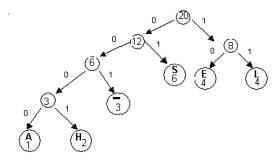
Example:
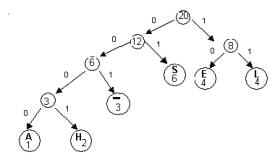
Consider the following Huffman tree, T which we built to encode
the message “SHE-SELLS-SEA-SHELLS”
1*4 + 2*4+3*3 + 6*2 + 4*2 + 4*2= 4
+ 8 + 9 + 12+ 8 +8 = 49 Definition. Suppose
T is a tree representing a prefix code for a file.The code isoptimal if C(T)
is minimal.
Note an optimal code is not unique – for a given file more than
one optimal code may exist. (Trivially, just change all 0’s to
1’s and 1’s to 0’s in any optimal code and you have another
optimal code).
With a precise definition of "optimal" in hand, we will prove
(in the next several exercises) that a Huffman tree is optimal.
Exercise 5: A full binary tree is a binary tree in
which ever non-leaf node has two children.
Notice that the Huffman trees in our examples have been full
trees.
Prove: Anoptimal prefix code for a
file is always represented by a full binary tree
Hint:Suppose there is a non-full
tree that did represent an optimal code.Find
a
contradiction by producing a better code.
Exercise 6: Show by means of a counter example that a
full binary tree may represent a prefix code which is not
optimal, even if all the letters with lower frequencies have
longer codewords.
Suggestion: Build another full tree for “SHE-SELLS-SEA-SHELLS”
which has a higher cost than the tree of our previous examples.
Exercise 7:
(skip this year)
Let x and y be two characters with the lowest frequencies.
(Arbitrarily, assume frequency(x) <= frequency(y)).Prove that there is an optimal tree
where x and yare siblings at the
maximum depth of the tree.
Hint:
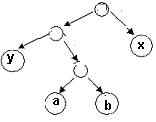
Assume that you have an optimal prefix tree, T, such thata and b are at the maximum depth.
(You can assume frequency (a)<=
frequency(b)).Here is a partial
view:
Now, because x and y have the two smallest frequencies
frequency(x) <= frequency(a) and frequency(y) <=
frequency(b).Also, length(a)
>= length(x) and length(b) >= length(y).
Now switch a and x, resulting in a new tree T’.Show C(T’) <= C(T)?. Now, in T’,switchy and b.ShowC(T’’)
<= C(T’)?
Exercise 8: (skip this year) Prove that Huffman’s algorithm produces an optimal prefix
code tree.
Outline of proof: Use mathematical induction on n, the
number of characters/leaves.
For n = 1, Huffman’s algorithm produces a tree with one
node, obviously optimal.
Now assume that for n leaves, Huffman’s algorithm
produces an optimal tree. Show that Huffman’s algorithm
produces an optimal tree for n+1 leaves.
Let Tn+1 be an optimal tree with n+1
leaves. We may assume that in an optimal tree the two
characters, say x and y, with the lowest
frequencies are siblings at the lowest level of the tree. (Why
may we assume that?).Now remove x
and y and replace them with a “new character z
with frequency(z) = frequency(x) + frequency(y).Call the new tree Tn.LetT’nbe the Huffman tree constructed from these n
charactersNow finish the
proof.
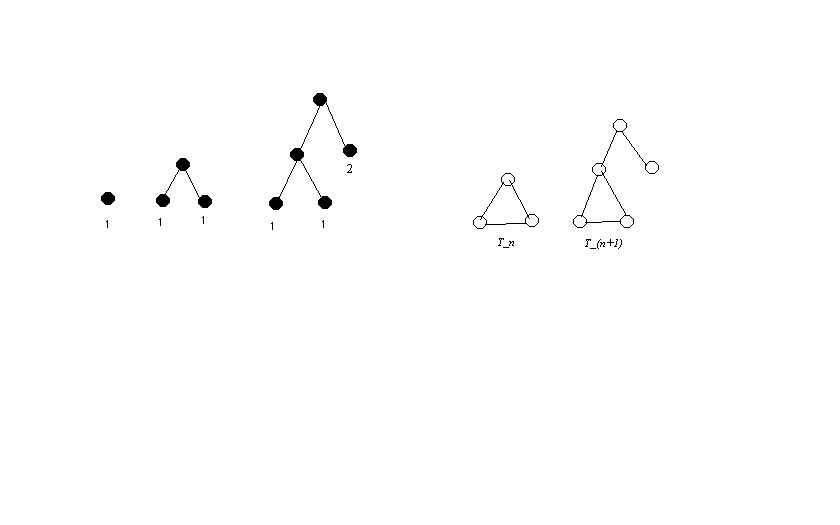
Exercise 9: The Huffman tree for frequencies equal to the
first n Fibonacci numbers results in a very
unbalanced encoding of n characters.
Suppose that the frequenciesfor the characters a, b, c, d, e, f, g, and
h are the first 8 Fibonacci numbers: 1,1,2,3,5,8,13,and 21.
Construct the Huffman tree.
What is the cost of the tree?
You found the cost for n = 8. Now you should
determine the general cost of the Huffman tree for n
characters when the frequencies are the first n
Fibonacci numbers.
a. Discover a
formula for the sum of the first n Fibonacci numbers,
and prove it by induction..
Fill in this chart to help
you get a good conjecture. Hint:
Look at Fibonacci(n + 2).
b. Prove that C(n) = C(n-1) + SumFib(n),
where C(1) = 0.
You can prove this by looking carefully
at the structure of the tree. Draw the trees. The
next tree is built inductively from the previous tree.
Fill in this chart to help you with your
proof. Hint: Line up the sums in the chart,
and examine the difference between two rows.
n
Fibonacci(n)
C(n) = Cost of Huffman tree for the
first n Fibonacci numbers
1
1
0*1 = 0
2
1
1*1 + 1*1 = 2
3
2
2*1 + 2*1 + 1*2 = 6
4
3
3*1 + 3*1 + 2*2 + 1*3 = 13
5
5
6
8
7
13
8
21
9
34
c. Using part (a), solve C(n) = C(n-1) + SumFib(n),
where C(1) = 0,. by repeated substitution, and write C(n) as
a closed form in terms of F(n), for n > 1.
1. What was
Fermat's "day job," i.e., how did he make a living?
2. Where did Andrew Wiles live when he worked on Fermat's
Last Theorem?
3. The statement of Fermat's Last Theorem was written in
the margin of Fermat's copy of Diophantus' book on
Arithmetic. According to his notes, why didn't Fermat
include his proof?
4. How many years elapsed (to the nearest hundred) between
the statement of Fermat's Last Theorem and its proof?
5. What two mathematical subjects that "live on different
planets" are bridged by the Taniyama-Shimura Conjecture?
6. Goro Shimura died in 2019 at the age of 89. What
happened to Taniyama?
7. The song "One Way or Another" that plays in the movie
is by what female 1980's punk vocal artist? (singer or
group name is acceptable)
8. After Wiles presented his result at a conference, he
reviewed his proof with colleague Nick Katz before it could be
published. What did they discover?
9. For how many years (within 3) did Wiles work on
Fermat's Last Theorem?
10. Which mathematician was not mentioned
in the movie The Proof? John Coates, Andrew Wiles, Peter Sarnak,
Ken Ribet, Noam Elkies, Sophie Germain, John Conway, Pierre de
Fermat, Goro Shimura, Barry Mazur, Nick Katz.